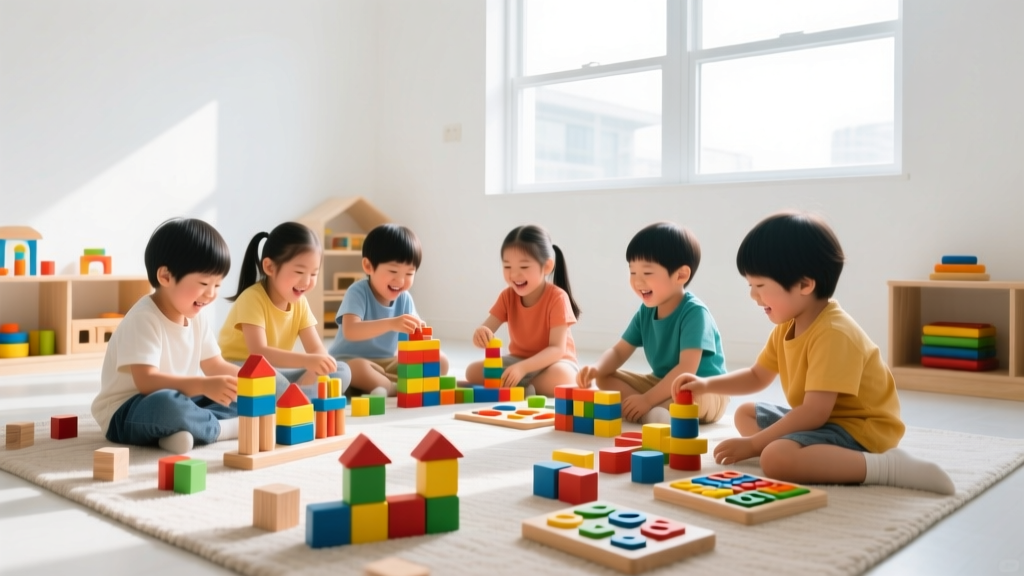
Best Screen-Free Coding Toys for Ages 4–8
Introducing young children to computational thinking doesn’t require a tablet or screen—it starts with play. In 2026, screen-free coding toys continue to thrive as trusted tools for building foundational skills like sequencing, pattern recognition, cause-and-effect reasoning, and perseverance. For parents of children ages 4–8, these tactile, engaging tools offer joyful, low-pressure entry points into coding concepts—no batteries, Wi-Fi, or screen time required.
Why Screen-Free Coding Matters for Young Learners
Early childhood development research consistently highlights the benefits of hands-on, multisensory learning. Screen-free coding toys support fine motor development, spatial awareness, collaborative play, and executive function—all while nurturing the core logic that underpins computer science. Unlike passive screen interactions, physical coding sets invite active experimentation: “What happens if I change this block?”, “How do I get the robot to the treasure?”, “Can I fix my path when it goes wrong?” These are authentic engineering mindsets—and they begin long before a keyboard is touched.
Top Screen-Free Coding Toys for Ages 4–8 (2026 Edition)
1. Botley 2.0 by Learning Resources
A perennial favorite—and still the gold standard for early robotics—Botley 2.0 is designed for ages 5+. Its intuitive, button-based programming interface requires zero app or screen. Kids lay out sequences using directional buttons (forward, left, right, 90° turn), then press “Go” to watch Botley execute up to 150 steps—including loops and conditionals via its “if-then” mode. The 2026 updated set includes new obstacle course accessories, a detachable remote control, and expanded challenge cards aligned with early elementary standards.
- ✅ No screen or app needed
- ✅ Teaches sequencing, looping, and debugging through physical feedback
- ✅ Includes 77-piece activity set with ramps, tunnels, and coding tiles
- ✅ Durable, battery-operated, and classroom-tested since 2020
2. Code & Go Robot Mouse Activity Set (Learning Resources)
Perfect for ages 4+, this award-winning set introduces pre-readers to coding logic using a friendly, chunky mouse robot and colorful maze board. Children place directional tiles (forward, left, right) on the grid to guide the mouse to cheese—a tangible, satisfying reward. The 2026 edition features an upgraded mouse with smoother wheels, brighter LED eyes, and 30 new challenge cards (including “multi-path” and “obstacle avoidance” levels).
- ✅ Ideal first coding experience for preschoolers and kindergarteners
- ✅ Reinforces directional language, counting, and planning ahead
- ✅ Includes 30 double-sided coding cards, 16 maze walls, and 10 activity guide pages
- ✅ Aligns with Head Start and NAEYC early learning guidelines
3. Cubetto Playset by Primo Toys
Cubetto remains beloved for its elegant, Montessori-inspired design. This wooden robot uses a tactile programming board where children place colorful blocks to create instructions (e.g., blue = forward, red = right, yellow = function). It’s 100% screen-free, open-ended, and inclusive—designed with universal access in mind (no reading, no fine-motor barriers). The 2026 Cubetto+ expansion adds storytelling modules, world maps, and cross-curricular lesson plans for home and classroom use.
- ✅ Designed for ages 3–6; especially supportive for neurodiverse learners
- ✅ Encourages collaboration, narrative thinking, and spatial mapping
- ✅ Made from sustainably sourced beechwood and non-toxic materials
- ✅ Backed by peer-reviewed studies on early computational fluency (MIT, 2024)
4. ThinkFun Robot Turtles
A board game that teaches real programming logic—no electronics required. Designed by a software engineer and tested with hundreds of kids, Robot Turtles uses cards and a turtle-themed game board to introduce sequencing, functions, and debugging. Players give commands (“move forward,” “turn left”) to advance their turtle toward a jewel. When things go awry? They learn to “debug” by adjusting their code cards. The 2026 Deluxe Edition includes bilingual (English/Spanish) instruction guides and a new “Adventure Mode” with branching paths.
- ✅ Ages 4+; works beautifully for mixed-age sibling play
- ✅ Builds confidence through immediate, visible outcomes
- ✅ No setup or charging—just unpack and play
- ✅ Supports social-emotional learning: taking turns, giving feedback, celebrating small wins
How to Choose the Right Toy for Your Child
Not all screen-free coding toys suit every child—or every family rhythm. Here’s how to match the tool to your child’s needs:
- Observe their play style: Does your child love building, solving puzzles, moving their body, or telling stories? Choose accordingly—Cubetto for tactile storytellers, Robot Turtles for social strategists, Botley for kinetic experimenters.
- Check fine motor readiness: If your child is still developing pincer grasp, avoid tiny pieces. Opt for large-button robots (Botley, Code & Go) or wooden blocks (Cubetto).
- Start simple, then scale: Begin with one-step sequences and gradually add loops or conditionals. Most sets include progressive challenge cards—use them!
- Play *with* them—at first: Sit beside your child for the first few sessions. Narrate your thinking aloud (“Hmm, let’s try turning right here instead.”) Modeling curiosity and resilience matters more than “getting it right.”
Simple Tips to Extend the Learning
Coding toys shine brightest when paired with everyday moments. Try these low-effort, high-impact ideas:
- Create “unplugged coding” routines: Turn bedtime into a sequence game—“First we brush teeth, then we pick pajamas, then we read one book.” Ask, “What would happen if we changed the order?”
- Add storytelling: Use Botley or Cubetto to act out a favorite book scene. “How does Goldilocks get to the bears’ house? Let’s code her path!”
- Invite debugging challenges: Intentionally make a mistake in their sequence and ask, “Can you spot what’s not working? How would you fix it?”
- Connect to nature: Map a garden path or backyard obstacle course with chalk, then “code” a walk-through using directional language.
Final Thoughts
In 2026, screen-free coding toys are more than just educational—they’re invitations to wonder, persistence, and joyful problem-solving. Whether your child is lining up blocks for Cubetto, guiding Botley through a living room maze, or laughing over a misdirected turtle in Robot Turtles, they’re building far more than coding skills. They’re cultivating patience, creativity, and the quiet confidence that comes from trying, failing, and trying again—with their hands, their minds, and their hearts fully engaged. You don’t need a screen to spark a lifelong love of logic—you just need time, curiosity, and the right toy to get started.
More Articles
 Simple Machine Projects Using Household Items (2026)
 What Is Technology for Kids? Beyond Screens (2026)
 Is Fantastic 4 for Kids? STEM Learning Guide (2026)
 What Is STEM for Kids? Real Benefits & Activities
 Teach Kids to Build Digital Products (2026)
 Privacy Trends 2026: AI, Regulation & Rights
 Sensory Tools for Home-Based Neurodiverse Support
 Kaleidoscope for Kids: Easy STEM Activity (2026)
 Science Experiments Using Kitchen Ingredients
 Mae Jemison’s Elementary School & STEM Journey