Best Robotics Kits for Kids: Age-Appropriate 2026 Guide
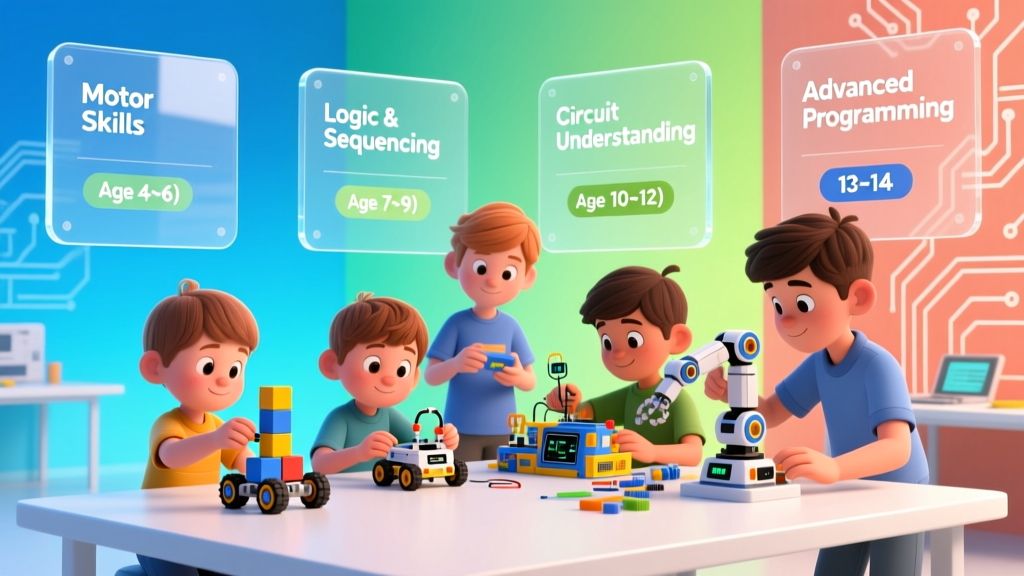
Robotics kits have exploded in quality and variety over the past five years. But with hundreds of options ranging from $30 to $500+, choosing the right kit for your child can feel overwhelming. As a tech journalist who's tested dozens of kits with children ages 4–14, I've developed a clear framework for matching kids with kits that challenge without frustrating — and that grow with them over years, not weeks.
Age-Based Recommendations
Ages 4–6: Screen-Free Introduction
Top Pick: Botley the Coding Robot 2.0 ($60)
No screens required. Children program Botley using a simple remote that sends commands (forward, turn, loop). Teaches sequencing and basic logic. The 40 included challenge cards provide structured progression. My 5-year-old tester spent three focused hours on her first session.
Ages 7–9: Block-Based Programming
Top Pick: LEGO Education SPIKE Essential ($280)
Combines LEGO building with motors, sensors, and block-based coding via the SPIKE app. Children build models (race cars, animals, machines) then program them to move and respond. The bridge between physical building and digital logic is uniquely powerful for this age group.
Ages 10–12: Text-Based Transition
Top Pick: Arduino Starter Kit ($80)
The gold standard for beginner electronics and programming. Includes an Arduino Uno board, sensors, LEDs, motors, and a project book with 15 guided projects. Children transition from block-based to C++ programming while building real electronic circuits.
Ages 13+: Advanced Building
Top Pick: Raspberry Pi Robot Kit ($120–200)
Full computer-on-a-board with Python programming. Build robots that can follow lines, avoid obstacles, or be controlled via WiFi. Bridges the gap between hobby and professional robotics.
Comparison Table
| Kit | Age | Price | Screen Required | Coding Level | Build Time |
|---|---|---|---|---|---|
| Botley 2.0 | 4–6 | $60 | No | None (physical) | 5 min |
| LEGO SPIKE | 7–9 | $280 | Yes (tablet) | Block-based | 30–60 min |
| Arduino Kit | 10–12 | $80 | Yes (computer) | C++ (simplified) | 1–3 hours |
| Raspberry Pi | 13+ | $120–200 | Yes | Python | 2–6 hours |
Frequently Asked Questions
My child has never done any coding. Where should I start?
Start with Botley (ages 4–6) or ScratchJr app + a simple robot like the Bee-Bot (ages 5–7). The key is building confidence with cause-and-effect programming before adding complexity. Don't rush to Arduino or Raspberry Pi — the foundation matters more than the sophistication.
Are expensive kits worth the investment?
LEGO SPIKE is the most expensive kit I recommend, and it's worth every penny for serious young builders because the replay value is enormous. For budget-conscious families, Arduino starter kits at $80 provide the best value-to-learning ratio. The cheapest option that still delivers real learning is the Botley at $60.
The Bottom Line
The best robotics kit is the one that matches your child's current abilities and sparks genuine curiosity. Start simple, let frustration guide upgrades, and remember: the goal isn't building the most complex robot — it's developing the engineering mindset that says "I can figure this out."
More Articles
 What Is Pollination for Kids? Fun Hands-On Learning
 Best Robotics Kits for Beginners (2026 Guide)
Board Games That Secretly Teach Math
Best Robotics Kits for Beginners (2026 Guide)
Board Games That Secretly Teach Math
 How to Teach Kids Programming: Evidence-Backed Strategies
 12 Best Science Experiments for Kids at Home in 2026
 Kids Wiring Guide: 7 Mistakes & Fixes (2026)
 Best Robotics Kits for Kids in 2026
 Is Sid the Science Kid Autistic? Experts Weigh In
 Is IXL Good for Kids? Real-World Results (2026)
 How Do Solar Panels Work for Kids (2026)